


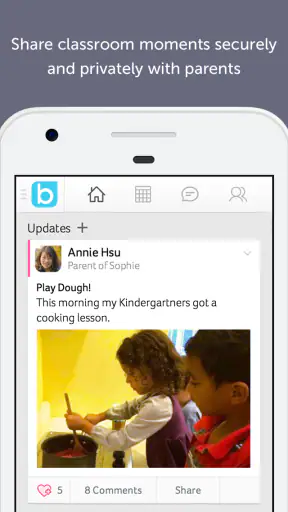
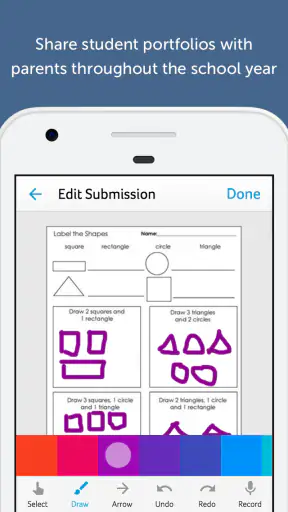
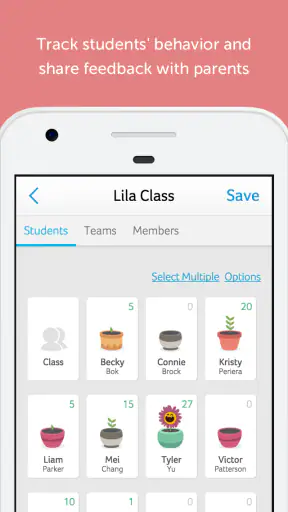
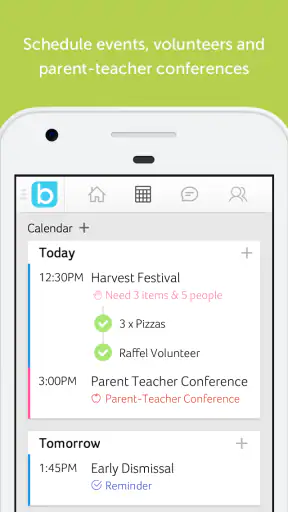
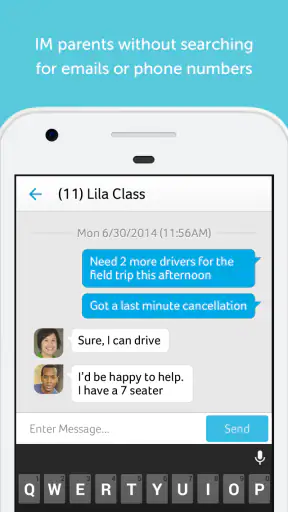
Keeping up with school communication can feel like a second job. Messages arrive through email, paper notices, classroom platforms, and sometimes separate tools for events or behavior updates. Bloomz takes a different approach by putting parent communication in one education-focused app. I see the appeal immediately: instead of asking families to remember several channels, a school or teacher can give them one place to check.
After spending time with it, my impression is that Bloomz works best as a shared communication space rather than as a complete learning platform. It is designed for the everyday connection between educators, schools, and families. That makes it useful for announcements, reminders, classroom updates, and conversations that are easy to lose in a crowded inbox. It also means that its value depends heavily on how consistently a school or teacher uses it.
The important distinction is this: Bloomz organizes communication, but it does not magically fix communication habits. When the people involved post regularly and keep information in the right place, the app can make family life easier. When updates remain scattered elsewhere, the experience becomes less convincing.
How Bloomz feels in its current form
Bloomz is an education app from Bloomz, offered free to download and suitable for Everyone. It has been available since October 18, 2014, and its current version is 6.2.8. That long presence matters because this is not a brand-new experiment trying to solve school communication for the first time. The product has had time to develop around a very specific problem: helping parents stay connected with the people responsible for their children’s education.
The audience is broader than just parents. Teachers can use it to keep a class informed, while schools can use it to create a more consistent communication routine. Families with more than one child may also appreciate having school-related conversations in one general environment instead of relying on a different system for every classroom.
In practical terms, I would treat Bloomz as a communication hub. I would not install it expecting a replacement for every academic tool a school might use. If a teacher needs a dedicated gradebook, a full assignment workflow, or advanced document collaboration, another service may remain necessary. Bloomz is more compelling when the main challenge is knowing what is happening and responding without hunting through multiple channels.
The app’s popularity suggests that this use case resonates. It has passed one million installs, with an average rating of 3.8 from around eighteen thousand ratings and roughly five thousand eight hundred written reviews. Those figures do not make it universally loved, but they do show a substantial audience and enough usage for common strengths and frustrations to become visible.
A realistic school-day example
Imagine a parent finishing work while trying to remember whether the class has a special activity the next morning. A paper note is somewhere in a backpack, an email thread is buried under unrelated messages, and a group chat contains several conversations that have nothing to do with school. In a well-organized Bloomz setup, the parent can open the app, check the relevant classroom space, read the teacher’s update, and respond in the same environment.
That scenario sounds simple, but the small reduction in searching is where the app earns its place. Parents are not usually asking for more technology. They are asking for fewer places to monitor. Bloomz is at its best when it reduces that mental load without turning every minor update into another notification demanding immediate attention.
What the current version means for everyday use
Version 6.2.8 is the build I would judge as the current experience, rather than relying on impressions from older versions. For an existing user, the most important point is continuity. A mature communication app should feel familiar enough that parents do not need to relearn the basics whenever the product changes. The current version suggests an ongoing product rather than an abandoned one, but the real benefit depends on the school’s configuration and communication discipline.
I also think the version number should temper expectations. A later version does not automatically mean every workflow is polished or that every school will use the same features. Bloomz can be configured around different communities, so two parents may have noticeably different experiences depending on whether their teachers use it for simple announcements or for a much wider range of interaction.
For a new family, the setup question is more important than the download itself: will the child’s school actively use Bloomz as a primary channel? If the answer is yes, the app has a clear purpose. If the school only posts occasional information while continuing to rely on email, printed notices, and another portal, Bloomz may become one more inbox rather than the single place it promises to be.
How the product has evolved and what that changes
Because Bloomz has been around since 2014, I view its evolution through the lens of a long-running communication product. Its central idea has stayed recognizable: connect families and educators in one app. That focus is a strength because it avoids pretending to be a general social network or a full school-management suite. The trade-off is that users looking for a highly specialized academic system may find its scope narrower than expected.
The current release gives existing users a reason to keep the app installed, but the more meaningful evolution is organizational rather than flashy. A communication platform becomes more useful as it gives people a dependable place to return to. The difference between a useful update and a forgotten message is often not a dramatic feature; it is whether the information is easy to locate later.
One of my favorite ways to use this kind of app is as a reference point rather than merely a live chat. If a teacher posts an important reminder, I can treat that classroom feed as the first place to check before asking the same question again. That creates a subtle but valuable habit: look through the existing conversation and announcements before starting a new message.
There is another useful workflow for busy households. I would check Bloomz at a planned time, such as after school or before preparing for the next day, instead of reacting to every alert instantly. This turns the app into a routine rather than a constant interruption. It is especially helpful for parents who want to stay informed but already receive many work and personal notifications.
Useful habits that are easy to miss
First, I would separate urgent information from reference information in my own routine. A same-day change deserves attention, while a general classroom note may only need to be remembered. Even if the app presents both through the same communication environment, the parent can avoid unnecessary stress by deciding what requires action and what simply needs to be seen.
Second, I would search the relevant classroom conversation before contacting the teacher. This is not just about saving the teacher time. It also reduces duplicate questions from parents and makes it easier to notice whether a detail has already been clarified. In a busy class, that small habit can make the communication stream more manageable.
Third, I would use Bloomz as a shared family reference rather than keeping every reminder in one parent’s memory. If both caregivers are involved, they can establish a simple routine for checking updates and confirming who will handle a school task. The app cannot replace family coordination, but a common information source is better than forwarding screenshots between separate messaging apps.
These are not dramatic hidden tricks. They are practical ways to get more value from a communication tool that can otherwise feel like just another notification feed. Bloomz rewards consistency: one place, one checking habit, and fewer parallel conversations.
Where it compares well with ordinary alternatives
Email remains the obvious alternative, and it still has advantages. It is familiar, searchable, and already part of most adults’ routines. However, school email threads can become difficult to follow when several classes, organizations, and personal messages share the same inbox. Bloomz has a stronger education-specific context, which can make school communication feel less mixed with everything else.
Group messaging apps can be faster for informal conversation, but they often blur the boundary between official notices and casual replies. They may also encourage parents to ask the same question repeatedly because older answers disappear into a fast-moving chat. Bloomz is a better fit when the school wants communication to remain connected to a classroom or school community rather than to a general social group.
Full learning-management systems are usually stronger for assignments, grades, files, and structured academic work. If that is the main requirement, I would choose the school’s established academic platform first. Bloomz makes more sense beside such a system when the missing piece is family communication, not coursework management.
That comparison explains both its appeal and its limitation. Bloomz is more focused than email and more organized than an informal group chat, but it may not have the depth of a platform built primarily for academic administration. I would recommend it as the communication layer, not automatically as the entire digital school experience.
The friction existing users may still notice
The biggest weakness is dependence on participation. A parent can install Bloomz, enable notifications, and check it faithfully, but the experience will still feel incomplete if teachers or administrators post inconsistently. This is a platform problem rather than a simple app problem: communication only becomes centralized when everyone agrees to centralize it.
There can also be a learning curve around where information belongs. A school announcement, a classroom update, and a direct question may not deserve the same treatment. If users post everything in the most visible place, important details can become harder to find. I would encourage schools to establish simple posting rules, and I would encourage parents to learn the difference between a general update and a message intended for one person.
Notifications are another area where judgment matters. Too few alerts can cause a parent to miss a time-sensitive change; too many can lead to notification fatigue and eventually get silenced. I would start conservatively, then adjust based on the school’s posting frequency. The right setting is not necessarily the one that produces the most alerts, but the one that keeps important information visible without making the app feel intrusive.
The free price makes trying Bloomz easy, but in-app purchases range from ninety-nine cents to one hundred twenty-four dollars and ninety-nine cents per item. That is worth noticing before assuming that every available capability is included at no cost. A family should understand which functions are part of the school’s arrangement and which may involve optional purchases, especially if the app becomes central to daily communication.
I also would not choose Bloomz solely because it is free. The real question is whether it reduces confusion. A free app that duplicates an existing school portal may add work, while a well-adopted app can be worthwhile even if families still use another system for grades or assignments.
Who should use it and who should look elsewhere
I think Bloomz is a strong candidate for parents who want school messages separated from personal email and informal chats. It is particularly suitable for families who regularly miss paper reminders or who manage communication for multiple children. The education focus gives the app a clearer purpose than a general messaging tool, and the shared environment can make it easier to keep track of recurring classroom information.
Teachers may also benefit when they need a practical way to communicate with families without maintaining several disconnected lists. The best results will come from teachers who can post consistently, keep messages concise, and make it clear where parents should ask questions. Bloomz cannot create that structure automatically, but it gives the structure a place to live.
I would be more cautious if you are looking for detailed academic tracking. Parents who mainly need grades, assignment submissions, formal feedback, or extensive file management may prefer a dedicated learning-management system. Bloomz may complement that system, but it should not be judged as though it were built for the same primary job.
I would also skip it, or at least delay installing it, if your school rarely uses it. A communication app only earns its place when the community is active. Before asking every family to adopt it, a school should decide whether Bloomz will be the main channel, how quickly teachers are expected to respond, and where official information will be posted. Without those decisions, families may end up checking several services just to feel safe.
Questions I would settle before committing
One practical question is whether the app will work for your household’s devices. Bloomz requires Android 7.0 or later on Android devices, so I would check the operating system before planning to use it as the only communication route. Families using older hardware should resolve that issue early rather than discovering it when an important school notice is expected.
Another question is whether both caregivers can participate in a way that suits the family. I would ask the school how invitations, classroom membership, and communication roles are handled before assuming that one parent can simply add everyone else. Clear onboarding is especially important when a child moves between classes or when more than one caregiver needs access.
You may also wonder whether Bloomz replaces email. My answer is no, not automatically. It can replace email as the main school-to-family channel if the school commits to it, but it cannot control messages from clubs, medical providers, transport services, or other organizations. I would keep email available while gradually treating Bloomz as the first stop for classroom information.
Privacy and notification expectations are worth discussing with the school as well. I would want to know what types of messages belong in the app, who can see replies, and how urgent announcements are identified. Those are community rules, not features that a download alone can settle. A clear policy makes the technology feel calmer and more trustworthy.
What I would watch in future use
For current users, I would watch whether the app continues to make older information easy to retrieve. Communication tools often feel good during a live conversation but become frustrating when a parent needs to find a reminder from several weeks earlier. The long-term test is not only whether messages arrive; it is whether the app helps families recover useful information without starting over.
I would also watch how Bloomz handles the balance between broad school communication and individual classroom needs. A school-wide announcement should not drown out a child’s classroom reminder, while a teacher’s specific message should not be confused with an official policy update. Good organization becomes increasingly important as more people and classes use the same environment.
The product’s evolution should be judged by practical improvements, not just a higher version number. I would look for smoother onboarding, clearer notification control, better separation between types of communication, and workflows that help teachers spend less time repeating information. Those are the areas most likely to affect whether families keep using the app after the initial rollout.
At the same time, I would not expect Bloomz to become the perfect replacement for every school system. Its strength is its focused role in parent communication. Expanding too far into academic administration could make it more complicated, while staying focused could leave some families needing a second platform. That trade-off is reasonable as long as the app remains clear about what it does best.
My final take after using Bloomz
Bloomz is a sensible choice when the real problem is scattered communication between schools and families. I like its focused purpose, its education-specific setting, and the possibility of replacing a messy mix of paper notes, crowded email threads, and informal group chats. The free entry point makes it easy for families to try, while the Everyone age rating keeps it approachable for a broad audience.
My recommendation comes with one condition: the school must use it seriously. If teachers and administrators post consistently, parents can build a dependable checking habit and gain a clearer view of what needs attention. If usage is occasional, the app risks becoming another place to look rather than the one place families hoped would simplify things.
The current version, 6.2.8, represents a mature product with a long history, but I would judge it by the quality of the communication routine around it. For parents seeking a dedicated family-school connection tool, Bloomz is worth trying. For families needing a full academic workspace, it is better viewed as a companion to a learning platform rather than a replacement.
In my experience, that makes the decision fairly straightforward. Install it when your school has committed to making it useful, set a manageable notification routine, and use the classroom conversation as a reference instead of treating it like another noisy chat. Used that way, Bloomz can turn school communication into a calmer daily habit—not perfect, but much easier to manage than a collection of disconnected channels.


